IOP-427 RNS-3-SS
TP-602 - SAFETY AND DE-ENERGIZATION PROCEDURES
Register your equipment with BHS Optima, BHS's free app.
GENERAL SAFETY
- Read and understand all instructions and warnings before using or servicing this equipment.
- Keep these instructions for future reference.
- Follow all federal, state and local requirements for handling and treatment of battery wash cabinet effluent.
- Recirculation/Neutralization System (RNS) units are not designed to be shipped or transported after initial delivery.
- A licensed structural engineer should be consulted prior to installing a RNS on any building level other than the ground floor.
- Perform system and safety check before operating.
- Failure to follow these instructions and warnings may result in property damage, personal injury or death.
WORK AREA
- Keep work area clean and well lit. Cluttered work areas and poor lighting can lead to accidents.
- Clean up/contain any fluid spills immediately to prevent slips or falls.
- Be aware of potential hazards when performing any service or maintenance to the unit.
SERVICE & MAINTENANCE
Service personnel shall wear Personal Protective Equipment (PPE) appropriate for the task being performed.
LOCKOUT/TAGOUT
Lockout/tagout the RNS per your corporate policy, if damaged or not functioning properly. Lockout/tagout and deenergize all systems prior to performing any maintenance or service to unit
LEAD-ACID BATTERIES-EXPLOSION HAZARD
.JPG)
Do not allow open flames or sparks of any kind near a battery. Highly explosive gas is generated when charging a battery that can remain in battery cells for extended periods of time after charging is complete.
- Always wear appropriate PPE including rubber apron, gloves, boots and full face shield when performing service or maintenance to any lead-acid batteries.
- Do not place metal or other conductive objects on top of battery. Arcing may occur causing damage to the battery and/or serious personal injury or death.
- Use only chargers matching the voltage and amperage of the battery being charged. Overcharging a battery can cause damage to the battery, charger and/or serious personal injury or death.
- Turn off charger before disconnecting battery from charger. Arcing between battery and charger connectors can cause damage to the connectors and/or serious personal injury or death.
BATTERY WASH WATER HAZARDS
HEAVY METALS:
Battery wash water contains heavy metals including (but not limited to) lead and antimony, which through prolonged exposure can lead to serious, long-term, adverse health conditions.
EXTREME pH LEVELS:
Highly acidic (low pH) as well as highly alkaline/ basic (high pH) solutions can cause severe burns, release toxic fumes, and cause violent chemical reactions when mixed with water or when mixed together.
- pH values outside of the BHS allowable range of 5 to 9 should be treated as “extreme” and caution should be taken to avoid direct contact with such solutions.
- Always wear appropriate PPE including rubber apron, gloves, boots and full face shield when working in contact with any battery wash water.
TREATMENT CHEMICALS:
Use of chemicals not approved by BHS to treat wash water may result in the release of toxic fumes.
OPERATIONAL SAFETY
OPERATIONAL SAFETY
- Only personnel trained in the proper and safe operation of RNS units may operate or service the RNS.
- Operators shall wear appropriate PPE suitable for working with industrial lead-acid batteries while operating the RNS (see prior page).
- All data plates, warning labels, placards, etc shall be in place and legible at all times. Contact BHS for replacement data plates, warning labels, placards or instructions.
- All users and service personnel shall be familiar with the meaning and risks associated with all data plates, warning labels, etc.
- Remove the RNS from service if damaged, defective, or operating improperly (or becomes such while operating) until repairs can be made to correct any problem(s).
- Only use BHS approved chemicals in the RNS. Severe chemical and/or toxic reactions may result.
DO’s AND DON’T’s
- DO NOT overfill the RNS reservoir.
- DO NOT operate the RNS when reservoir is empty.
- DO NOT modify or fit the RNS with attachments without prior, written approval from BHS.
- DO NOT operate the RNS with any guard or cover removed unless required for maintenance or repair.
- Disconnect RNS from all power sources before attempting to perform service or maintenance to the unit.
- DO NOT immerse any body part into the RNS holding tank water.
- DO NOT use any chemicals in the RNS that are not approved by BHS.
- DO NOT use the RNS to wash anything other than industrial lead-acid batteries.
- DO NOT use foaming type detergents in conjunction with the RNS.
- DO NOT use soda ash or similar types of neutralizers.
- Use only fully liquefi ed neutralizers.
- DO NOT spray personnel or electrical components with spray wand (if equipped).
- DO NOT use the RNS in a manner for which it is not intended. Some examples of prohibited use are but not limited to:
 » As an emergency wash station
 » As a parts washer
 » As a battery room wash-down device
 » As a battery acid disposal device
DE-ENERGIZATION
- Turn off and disconnect power to the RNS. (Note: The green power light will go out). See Figures 1.1 & 1.2.
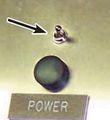
FIGURE 1.1
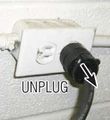
FIGURE 1.2
- Open the control panel door and remove the 17.5A fuse (the left most fuse) from the control board. See Figure 2.
- Reconnect power to and turn on the RNS.
- Press the RECIRCULATE button to activate the recirculation cycle (default time is 20 minutes). Turn off the RNS after 10 seconds. See Figure 3.

FIGURE 2
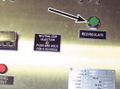
FIGURE 3
- If equipped with a spray wand, hold the trigger on the wand to release any residual pressure. If connected to a BWC, cycle the BWC through one complete wash to release residual water pressure. See Figures 4 & 5.
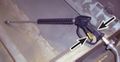
FIGURE 4
FIGURE 5
- Disconnect electrical power to the RNS.
TP-602_figure_1.1.jpg)
TP-602_figure_1.2.jpg)
TP-602_figure_2.jpg)
TP-602_figure_3.jpg)
.JPG) Failure to release any stored water pressure could result in an unexpected spray of wash water.
Failure to release any stored water pressure could result in an unexpected spray of wash water.
TP-602_figure_4.jpg)
TP-602_figure_5.jpg) Failure to disconnect electrical power to the RNS could result in electrical shock.
Failure to disconnect electrical power to the RNS could result in electrical shock.
GENERAL INFORMATION
INTRODUCTION
The RNS-3-SS is a closed loop system to supply and recycle the water used in cleaning forklift batteries.
The main objective of the RNS-3-SS is to:
1.) Remove contaminants associated with lead/acid batteries.
2.) Filter and reclaim water for multiple cycles.
3.) Keep contaminants contained until proper disposal method is obtained.
The basic mechanical operation includes: pumping water from the reservoir through the filters, into a battery wash unit, through the sump assembly, and back into the reservoir.
The system consists of the following major components and assemblies.
A.) Completely self contained cabinet with integral 200 gallon tank.
B.) Electrical component area.
C.) Water control solenoid valve
D.) Filters
E.) Water Pump
F.) Sump pump and fl oat switch (remote mounted to wash cabinet)
WATER MONITORING GENERAL DESCRIPTION
The pH level of the water stored in the RNS-3-SS is monitored by a hand held meter which is supplied from the factory. It is the user’s responsibility to keep the pH level within acceptable levels in order to avoid damage to components. See Section 4-3 for pH monitoring information.
PAGE_2.jpg)
LEADING PARTICULARS
PAGE_3.jpg)
FRONT & SIDE VIEW OF UNIT
PAGE_4.jpg)
INSTALLATION
GENERAL
The following paragraphs provide installation instructions for the RNS-3-SS. Instructions provided include: unpacking, positioning, power and water installation.
The following tools and materials will be required for system installation:
Channel Lock Pliers
Screw Driver (Standard, 1/4” Blade)
Adjustable Wrench (1/2”)
Measuring Tape (12’)
Level (12”)
Water Hose (length as required)
Liquid Neutralizing Conditioner (LNC) - one gallon supplied
Optional:
Heat Gun (to aid in hose attachment)
UNPACKING
A.) Place package system in general area of its operating location. Location considerations should be: within proximity to water supply, electrical power supply, vehicle entrance, and battery station locations.
B.) Cut wrapping bands and unstrap the system. Be careful not to scratch, cut or bend any components on system while unpacking.
C.) Inspect the system components for any signs of damage. Take particular note of any evidence of rough handling in transit. Immediately report any damage to shipping agent.
D.) Utilizing plant’s best technique, lift RNS-3-SS from its shipping skids and remove the skids from the area.
POSITIONING
The RNS-3-SS should be positioned where it will not interfere with the battery washing operation. Also, the distance from the battery wash unit should accommodate the interconnections between the system and the battery wash unit. The following paragraphs provide instructions for positioning of the system assemblies.
A.) Move RNS-3-SS into a position not further than 10 feet from the battery wash unit.
B.) Ensure that unit is level. If necessary, place shims under feet to level.
POWER CABLE
Unit is supplied with an AC line cord. A dedicated, 120 volt, 20 amp circuit with GFCI protection is required. The use of an extension cord is not recommended.
INNER CONNECTION TO WASH CABINET
There are 3 connections from the RNS-3-SS to a battery wash cabinet. (Typical BHS model number BWC-2).
A.) Attach the 3/4” I.D. hose from the water outlet of the RNS to the water inlet of the BWC-2. Note: This connection should be made AFTER completing procedures in 2-6.
B.) Attach the 1” I.D. hose from the sump pump outlet to the return inlet of the RNS.
C.) Connect the DC line cord from the sump pump to the 12 volt DC power outlet of the RNS.
SEE FIGURES 1-4 AND 2-1
-12.jpg)
FIGURE 2-1
-13.jpg)
FIGURE 2-3
INITIAL START UP PROCEDURE
A.) Prior to final hook up of the 3/4” pressure line to the wash cabinet, take the end of the hose and route it to the inside of the wash cabinet or a drain.
B.) Plug the RNS in to a 120 volt receptacle that is GFCI protected. See Section 2-4.
C.) Move the power toggle switch to the “on” position. The unit should start pumping immediately.
D.) Run the unit until all air is purged from the water circuit then turn the power switch to the “off” position and disconnect the power cord from the receptacle.
E.) Proceed with the connection of the pressure line to the wash cabinet. The RNS-3-SS is now ready for normal operation.
NOTE: If the RNS is being used with a manual wash unit, follow all the instructions above except the pressure line will have a spray wand attached. Air purging can be done by depressing the trigger of the wand while powering up the RNS as described above.
OPERATION
CONTROL CONSOLE
PAGE_8.jpg)
OPERATING INSTRUCTIONS
The RNS-3-SS is an automatic “ON DEMAND” water supply system. Once the unit has been set up and had the initial start up procedure completed, it is ready to operate with no further requirements.
Simply put the power switch in the “ON” position and when the pressure switch senses a drop in pressure or fl ow demand, it will start the pump system as needed and shut off automatically when the demand has ceased.
PLUMBING CIRCUIT THEORY OF OPERATION
REFERENCE FIGURE 3-3
Water is pulled from the bottom outlet port of water tank through the shut off valve and a 100 mesh strainer to the pump inlet.
The water from the pressure side (outlet side) of the pump fl ows through a reverse fl ow check valve, past the main system relief valve, pressure sensor, and gauge. The relief valve is activated if there is a failure in the pump or pressure switch that could cause over pressurization to occur.
Water is then pushed through the 5 micron filter assembly to the solenoid operated water valve.
Under normal operating conditions the solenoid operated valve for the recirculate mode is closed and is activated only when the recirculate function is actuated.
As demand/flow is required at the wash cabinet, the output water goes into the sump area of the wash cabinet base where a float switch is located.
When the water in the sump reaches a depth adequate to energize the float switch, it then energizes the sump pump mounted on the back of the wash cabinet that pumps the spent water back to the RNS return inlet.
As the water passes through the inlet it is dumped into a 50 micron bag filter to remove any debris larger than 50 microns.
The water is held in storage for recycling through the system.
PAGE_10.jpg)
ELECTRICAL CIRCUIT THEORY OF OPERATION
REFERENCE FIGURE 3-4
When the power switch is activated the pump motor and 12 volt DC control circuit are energized. The green power indicator light (LT1) is also energized. When the pump reaches the maximum pressure preset at the pressure switch, the switch (PS) opens and disconnects the pump motor. As a pressure drop is sensed, PS closes and initiates pump start up. PS is preset at the factory for 55 - 70 psi.
If the water level falls below the minimum level required for proper operation, fl oat switch (FS1) energizes the low water indicator light (LT2) as well as relay (CR1), which in turn closes the solenoid operated valve to the wash cabinet (CR1-2) and also opens (MS1-1) and (MS1-2), disconnecting the pump circuit.
In the event of pH imbalance, the proper chemical must be added and the recirculate mode should be energized. Actuating the recirculate energizes relay (CR1) and a timer relay (TR1). (MS1-1) and (MS1-2), and the solenoid operated valve for water circulation to tank (via CR1-1) are energized. The timer relay (TR1) is preset for a 20 minute period. After the unit times out and if the pH imbalance has been corrected, all circuits can resume their normal state, ready for operation.
PAGE_12.jpg)
MAINTENANCE
It is imperative all equipment be inspected and maintained on a regular basis to ensure a long dependable life from your investment. The following information is a rule of thumb only and should be adjusted based on; environment, amount of run time, condition of batteries to be cleaned, etc. As you fi rst start a battery cleaning program, you may fi nd it necessary to have increased inspection and maintenance requirements. But if a good regimen is followed and batteries are kept in a cleaner state, these increases should subside and you will be able to get a better feel for your own individual scheduling of maintenance.
PERIODIC INSPECTIONS
On the following page is an operator/maintenance spread sheet for daily and weekly inspections. The daily tasks are noted by a (D) and the weekly tasks are noted by a (W) in the task column. Copies should be made and stored in an area of your battery room or maintenance department for accessibility by authorized personnel. Some of the inspections noted may require the removal of a particular access panel to accomplish. Refer to the parts/component location figures further back in this manual.
PERIODIC MAINTENANCE
A.) Inlet Strainer Screen
The inlet strainer screen should be inspected and cleaned at regular intervals. A good starting point would be monthly until such time as you can validate the correct time frame for your application.
PROCEDURE: REFERENCE FIGURE 4-2A
- Remove the front panel to access the plumbing compartment (**See SAFETY WARNING #5 from page ii). Turn the main water shut off valve to the “OFF” position.
- Push the RECIRCULATE button and allow the unit to de-pressurize for 5 seconds and then turn the main power switch to the “OFF” position.
- Place a container under the strainer housing to capture the water when the housing is loosened.
- Unscrew the strainer housing until fl ow of water starts. Allow to drain until flow has diminished.
- Remove the housing to access the filter screen and remove the screen from body.
- Flush as required to remove any solid debris that may be captured in screen.
- Replace screen into body and re-attach housing to hand tight only.
- Turn the main water shut off valve to the “ON” position.
- Allow to stand a few minutes and inspect for leaks. Correct as needed.
- Return power switch to the “ON” position, depress the recirculation button to allow the unit to cycle and remove the air from the system.
- Re-install front panel.
- Normal operation can now be resumed.
 DO NOT allow the unit to run more than 10 seconds with the water valve shut off. Serious pump damage could occur.
PAGE_14.jpg)
-21.jpg)
FIGURE 4-2A
B.) 5 Micron Filter Cartridge Replacement
The filter cartridge should be changed on a regular basis in order to keep down any restrictions of fl ow in the system. This may be required more frequently as you first start your new battery cleaning program. Symptoms of a restricted filter are reduced flow to the wash cabinet or wand and/or short cycling of the pump pressure switch.
PROCEDURE: REFERENCE FIGURE 4-2B
- Remove the front panel to access the plumbing compartment (**See SAFETY WARNING #5 from page ii). Turn the main water shut off valve to the “OFF” position.
- Push the RECIRCULATE button and allow the unit to de-pressurize for 5 seconds and then turn the main power switch to the “OFF” position.
- Place a container under the filter housing to capture the water when the housing is loosened.
- Unscrew the filter housing bowl until flow of water starts. Allow to drain until flow has diminished.
- Remove the housing bowl to access the filter cartridge and remove the cartridge from barrel.
- Place the new cartridge into the housing barrel.
- Verify the large O-ring is in the groove of the housing barrel and re-attach. Hand tighten, then apply one quarter turn more with a strap wrench.
- Turn the main water shut off valve to the “ON” position, depress the recirculation button to allow the unit to cycle and remove the air from the system.
- Return power switch to the “ON” position, depress the recirculation button to allow the unit to cycle and remove the air from the system.
- Allow to stand a few minutes and inspect for leaks. Correct as needed.
- Re-install front panel.
- Normal operation can now be resumed.
DO NOT allow the unit to run more than 10 seconds with the water valve shut off. Serious pump damage could occur.
C.) Return Inlet Bag Filter The bag filter should be replaced as required, when the return water from the sump pump starts to back up onto the bag mounting platform or before.
PROCEDURE: REFERENCE FIGURE 4-2C
- Turn the power switch to the “OFF” position.
- Remove the water tank cover by unhooking the four latches located on the sides of the unit. Assistance is recommended for removal of cover.
- Remove the bag filter by lifting the top ring of the filter and slowly sliding it to either side of the bag mounting platform. (The return line assembly may be removed for easier access if desired.)
- Allow excess water to drain off bag filter before removal.
- Place a new bag filter into the mounting hole and replace tank cover. (Replace the return line assembly if removed)
-22.jpg)
FIGURE 4-2B
PAGE_17.jpg)
PAGE_18.jpg)
pH METER AND MONITORING
pH LEVEL MONITORING
Consistent monitoring of pH levels in recirculation and neutralization systems is the single most important step in preventing part failures, insuring smooth operation and extending the life of the system. Failures due to improper pH levels will not be covered under warranty.
The pH level should never drop below 5.0 or rise above 9.0. Allowing the pH levels outside these parameters will result in premature failure of the sump pump and fl oat switch in the battery wash cabinet. Left unchecked, further damage may be done to the relief valve and the system pump in the RNS.
It is recommended that pH levels are checked at least daily under normal conditions. If a large number of batteries are going to be washed or if batteries that have not been well maintained are going to be washed for the first time, it is recommended that the pH be checked after every second or third battery and neutralizer added accordingly. After several pH tests, adjust the frequency of testing accordingly.
The pH level should be checked at the start of each shift as a part of the daily checklist of the entire battery handling system.
pH METER USE AND CARE
It is important that the pH meter sent with the RNS-3-SS is properly maintained and calibrated in order to ensure that correct pH readings are displayed when testing the water in the RNS-3-SS tank.
BHS provides 2 different bottles of pH solution used to calibrate the pH meter. One bottle contains solution at 7.0 pH and the other bottle contains solution at 4.0 pH. To calibrate the unit, first immerse the probe end of the unit in to the 7.0 pH solution and use the screwdriver provided with the unit (or a very small standard screwdriver) to turn the screw inside of the hole below the display until the display reads 7.0. Then immerse the probe end of the unit into the 4.0 pH solution and confirm the reading goes down to 4.0 pH +/- 0.1. If the unit reads properly when switched between the 2 solutions, the unit is properly calibrated. If the reading in the display does not go down to 4.0 pH, the bulb on the probe end of the pH meter may be dried out and will not obtain a true reading. At this point you can try soaking the probe end of the unit for a couple of hours in the 7.0 pH solution to see if the meter will re-hydrate. If it will not, the meter will need to be replaced.
To prevent the bulb from drying out you will need to keep a small amount of the 7.0 pH solution in the cap of the pH meter. When the meter is not in use, it must be stored standing upright and not laying on its side.
These procedures are outlined in the instructions that come with the pH meter and are available from the BHS Tech support group.
-25.jpg)
TROUBLESHOOTING
PAGE_20.jpg)
PARTS LIST & ELECTRICAL SCHEMATICS
PAGE_21.jpg)
PAGE_22.jpg)
PAGE_23.jpg)
PAGE_24.jpg)
PAGE_25.jpg)
PAGE_26.jpg)
PAGE_27.jpg)
STATEMENT OF WARRANTY AND LIABILITY
STATEMENT OF WARRANTY AND LIABILITY
Battery Handling Systems, Inc., or its subsidiary that sells the equipment (BHS) warrants to the original purchaser of its equipment, that the equipment will be free from defects in material and workmanship under normal and proper use, operation and maintenance for a period of 13 months from date of shipment to the original purchaser with respect to: frames, weldments, electric drives, motors (except brushes), motor driven pumps, valves, and drive wheel assemblies (except wheels).
The above warranty will remain in effect with respect to all other parts for a period of ninety (90) days after shipment. Bulbs, fuses and filters are not warranted unless found to be defective prior to use or ninety (90) days after shipment, whichever occurs first.
BHS will, at its option, either provide parts and labor to repair or replace, or grant a credit or refund of the purchase price of, any equipment or part which is determined by BHS to be defective within the above mentioned warranty period, provided BHS’ procedures for warranty claims are followed. These procedures are set forth on the reverse side hereof and are also available upon request. Repaired or replacement equipment and parts will carry the foregoing warranty for the remainder of the original warranty period or ninety (90) days from the date of shipment, whichever is longer.
BHS will also cover normal ground freight charges such as ground UPS, common carrier, etc. The cost of any express delivery, if requested, will be the sole responsibility of the purchaser, and the purchaser agrees to provide its account number with its preferred carrier to BHS or to pay the entire cost of express delivery as a condition of BHS’ provision of such express delivery. Unless authorized in writing by BHS, the foregoing warranty does not cover the cost of removal or reinstallation (or the cost of other activities ancillary thereto), the cost of which will be borne solely by the purchaser.
A claimed defect must be discovered during the applicable warranty period, and notice of any claimed defect must be reported immediately to BHS or an authorized dealer prior to repair, replacement or refund or credit in accordance with the BHS warranty and warranty procedures, but in no event more than thirty (30) days after discovery of the claimed defect.
BHS’ warranty does not cover incidents of abuse, misuse, accidents, overloading, improper installation, repair or maintenance (other than by BHS), or application of products not in accordance with the instruction manual and product application bulletins. BHS’ warranty does not cover incidents or defects where the equipment has been modified or used in conjunction with other products without the prior written approval of BHS.
This warranty does not cover accessories and attachments not manufactured by BHS. The original manufacturer’s warranty, if any, for such accessories or attachments takes precedence and all claims shall be directed to their respective manufacturers.
ANY LITIGATION TO ENFORCE THE FOREGOING WARRANTY MUST BE COMMENCED NO LATER THAN ONE (1) YEAR AFTER DISCOVERY REASONABLY SHOULD HAVE BEEN MADE OF ANY FACTS OR OTHER INFORMATION SUGGESTING THE EXISTENCE OF A PRODUCT FAILURE OR A PRODUCT DEFECT. THE WARRANTY SET FORTH HEREIN IS THE COMPLETE AND ENTIRE WARRANTY MADE BY BHS, AND THERE ARE NO OTHER WARRANTIES, EXPRESS OR IMPLIED, WHETHER OF MERCHANTABILITY, FITNESS FOR A PARTICULAR PURPOSE, NON-INFRINGEMENT OR OTHERWISE, MADE BY BHS. NO PERSON IS AUTHORIZED TO MAKE ANY OTHER OR ADDITIONAL WARRANTY ON BEHALF OF BHS. THE RIGHT TO REPAIR, REPLACEMENT OR CREDIT/REFUND, AS SET FORTH HEREIN, IS THE SOLE AND EXCLUSIVE REMEDY FOR BREACH OF THE ABOVE WARRANTY. BHS SHALL NOT BE LIABLE FOR CHARGES OR EXPENSES OF ANY NATURE UNDER THE FOREGOING WARRANTY INCURRED WITHOUT BHS’ CONSENT. FURTHERMORE, UNDER NO CIRCUMSTANCES, REGARDLESS OF THE FORM OF THE CLAIM OR CAUSE OF ACTION (WHETHER IN WARRANTY, CONTRACT, INFRINGEMENT, NEGLIGENCE, STRICT LIABILITY, OTHER TORT, OR OTHERWISE), WILL BHS BE LIABLE FOR: (A) INCIDENTAL DAMAGES (EXCEPT AS SPECIFICALLY PROVIDED FOR ABOVE), OR CONSEQUENTIAL, INDIRECT, SPECIAL OR PUNITIVE DAMAGES; OR (B) DIRECT DAMAGES IN EXCESS OF THE PURCHASE PRICE OF THE BHS EQUIPMENT GIVING RISE TO THE CLAIM OR CAUSE OF ACTION. “CONSEQUENTIAL DAMAGES” INCLUDE, WITHOUT LIMITATION, LOST PROFITS, BUSINESS INTERRUPTION DAMAGES, LOSS OF USE DAMAGES AND DAMAGE TO REPUTATION OR GOODWILL.
Warranty Procedures
WARRANTY PROCEDURES
Please refer to Battery Handling Systems, Inc.’s Statement of Warranty and Liability (which is set forth on the reverse side hereof or available upon request) for a complete description of BHS’ warranty. In the event of conflict between BHS’ warranty and these procedures, the warranty will control.
Battery Handling Systems, Inc.’s warranty policy is intended to protect original purchasers who submit valid claims, as well as to identify and eliminate claims where product failure is the result of customer abuse, neglect or misapplication.
Step 1: Gather Information The following information must be provided immediately.
- A description of the product that includes, at a minimum, the model, serial number, and hour meter reading (if applicable).
- Customer name, location, and contact information including phone number.
- Installation date, installation provider (dealer), servicing dealer, and selling dealer.
- Any prior repairs, modification, or adjustments.
Step 2: Contact BHS
Contact BHS at: Toll Free: 1.877.247.4968 Local: 1.314.890.0953 Fax: 1.314.423.5948 Email: service@bhs1.com
Step 3: Authorization
BHS will authorize further evaluation, repair, or replacement. A warranty claim form indicating BHS prior authorization for any such action will be issued to claimant. The completed warranty claim form must be submitted with any request for warranty credit.
Step 4: Request RGA Number
- Suspected defective parts must be returned to BHS under an issued Return Goods Authorization (RGA) number.
- BHS will specify the proper disposition of the parts through the issue of an RGA number.
- Return shipment method will also be specified at time of RGA issue. RGAs are good for thirty (30) days from date issued; no credit will be issued for items returned after the RGA has expired.
Step 5: Claim Warranty
- Submit Warranty Claim forms and supporting documents to: Battery Handling Systems, Inc.
P.O. Box 28990 St. Louis, MO 63132
Fax: 1.314.423.5948
Email: service@bhs1.com
- Labor allowance hours are determined by our engineering staff.
- Actual travel time, labor time, and parts costs must be indicated as separate items as provided on the form.
Step 6: BHS will process warranty claim and notify purchaser of final disposition.
1.877.BHS-4YOU
www.bhs1.com